
Portfolio Management
Subscribe and Save: The Complete Guide for Amazon Vendors
 Written by Martin HeubelUpdated 21 Sept 2026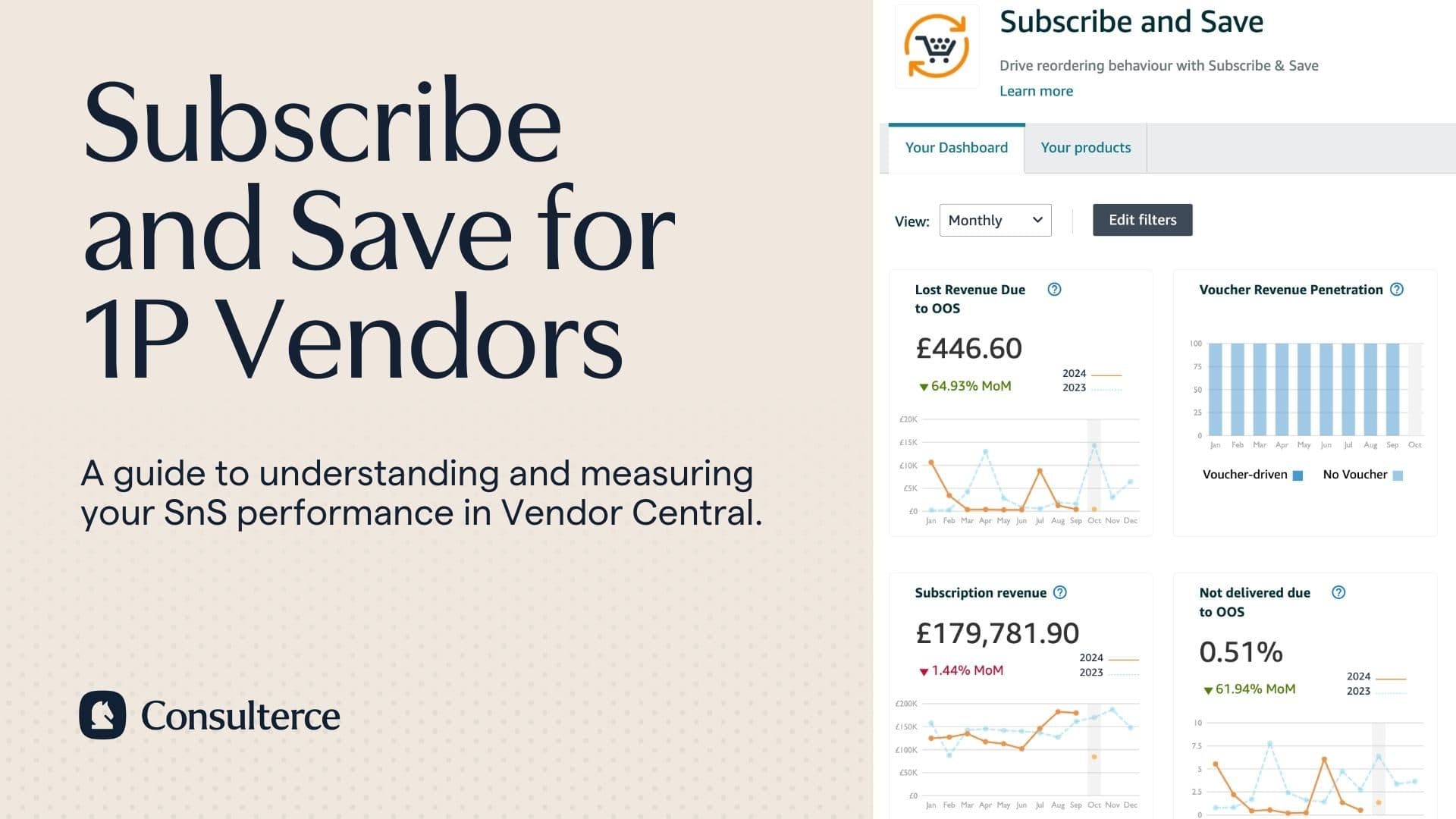
If you're a brand in the Consumer Packaged Goods (CPG) industry, chances are your customers repeat their purchase when running out of supply.
But they won't necessarily buy again from your brand. Your rivals compete on price and for similar keywords in the search on Amazon. Increasing the risk of losing the sale to one of your competitors.
Does this mean you have to spend millions of dollars to win search placements on the virtual shelf?
No it doesn't.
Thankfully, Amazon offers a programme called 'Subscribe and Save' to help keep existing customers loyal to your brand.
So in today's article, we'll cover:
Let's get to it.
What is Subscribe and Save?
Subscribe and Save is a customer retention programme that allows shoppers to setup auto-scheduled deliveries in exchange for a discount.
The programme is designed to let shoppers easily opt in or out of a subscription. Buyers can decide how often they would like to receive their products. SnS order intervals range from every 2 weeks to every 6 months.
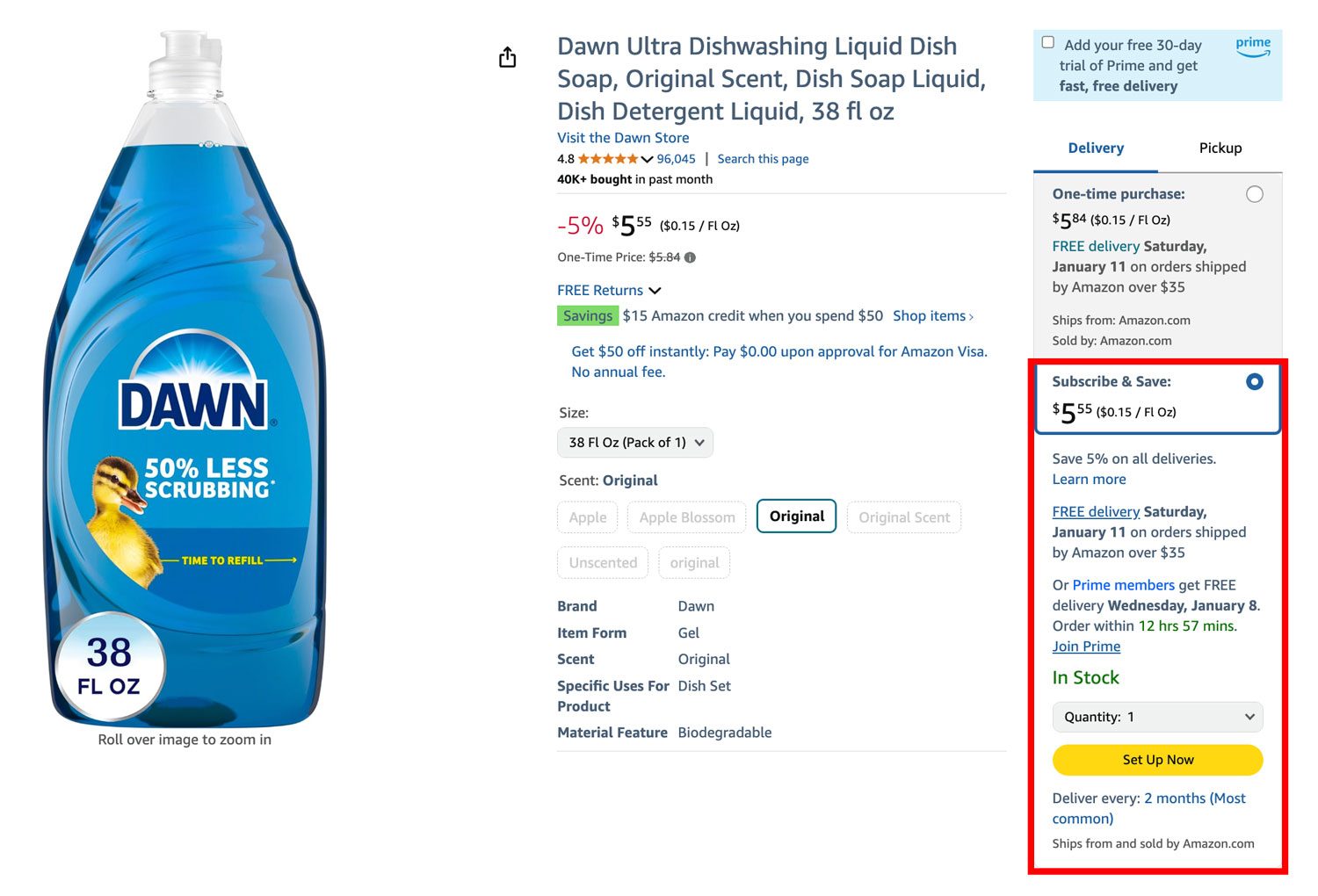
SnS discounts range from 5% to 15% on most products and up to 20% on selected items (e.g., diapers).
Shoppers typically receive an initial 5% or 10% discount on their first order and 10% or 15% on every order thereafter. In some markets and categories, shoppers also qualify for the SnS discount if they subscribe to at least 5 products shipped to a single address.
While default discount structures are determined by Amazon, brands can choose to offer additional Coupon savings to stimulate SnS orders.
Why should brands consider Subscribe and Save?
Offering Subscribe and Save can help reduce your reliance on sales events and lower your customer acquisition costs.
Instead of retargeting shoppers with expensive ad campaigns, you can offer them a discount to automatically repeat their purchase from your brand.
Categories with consumables or single-use products that need replacement promise the best return on investment in Subscribe and Save.
For example:
- Grocery
- Beer, Wines & Spirits
- Luxury Food & Drink
- Pet Supplies
- Health & Wellness
- Beauty & Personal Care
- Baby Care
- Household & Home Care
- Office Supplies
- Automotive Parts & Tools
- Home Improvement
But Subscribe and Save isn't just a sales tool for sellers and vendors!
It also allows Amazon to pool orders of otherwise individually sold items, reducing the variable handling and shipping costs for the online retailer.
How can 1P Vendors invest in Subscribe and Save?
Amazon will ask vendors in relevant categories to invest in Subscribe and Save to maximise their growth potential. So let's take a closer look at the contractual options and types of SnS investments:
Flex Agreement vs Fixed Accrual Percentage
Vendor Managers can offer you two ways to invest in SnS: Either via a Flex Agreement or Fixed Accrual.
A Flex Agreement compensates Amazon for every SnS discount redeemed by end shoppers. This means that if a shopper receives a 5% discount, Amazon will bill you for the equivalent dollar value.
With the Fixed Accrual, Amazon bills you a fixed percentage of your net sales to activate Subscribe and Save.
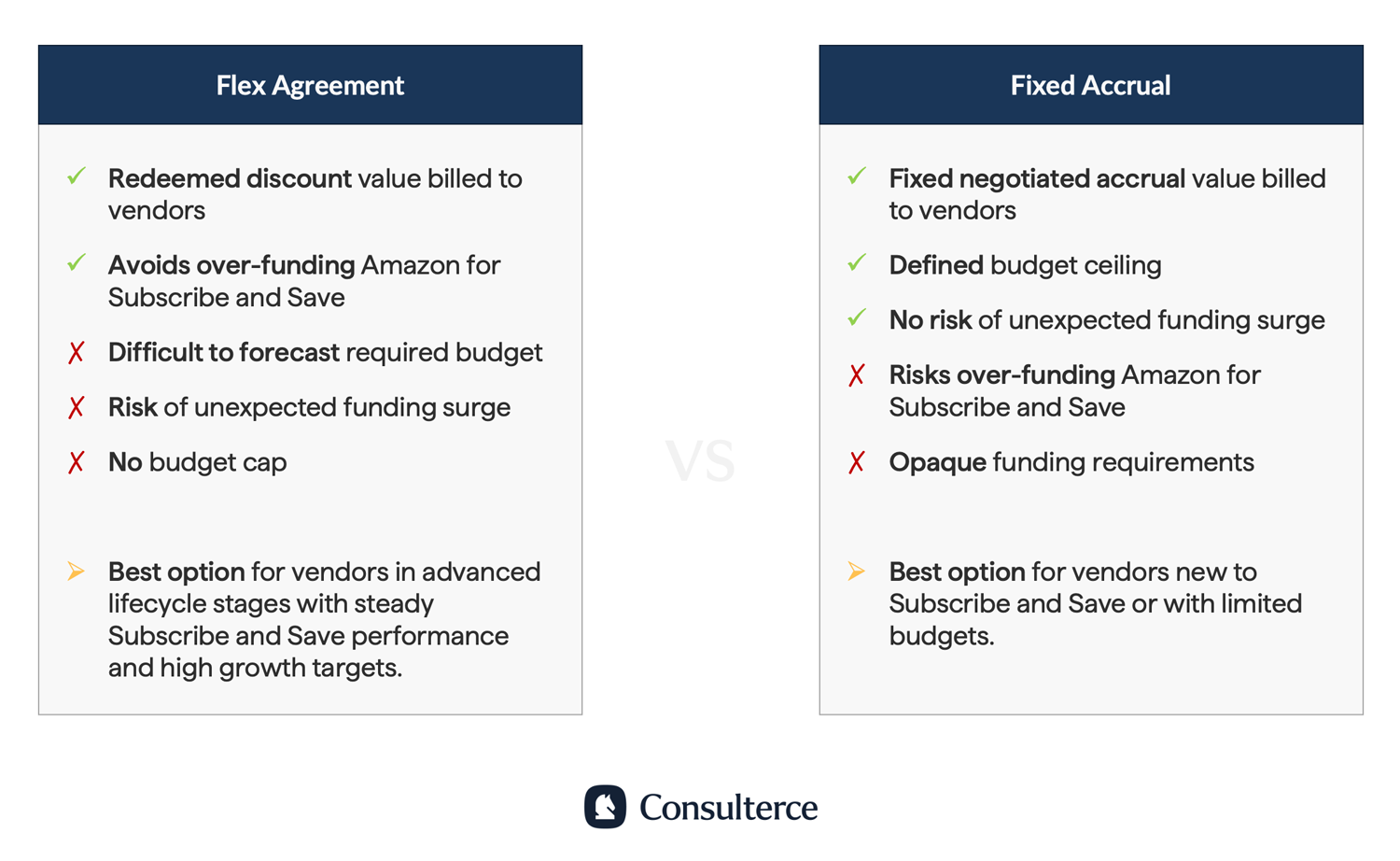
The main advantage of a fixed accrual is that Amazon assumes the risk if the redeemed discount value exceeds the funding amount during the contract period.
For example, if customers redeem SnS rebates worth 6% of your total net sales, but you have only compensated Amazon with a 5% trade term, Amazon will foot the bill for the 1% difference.
This makes fixed accruals an attractive option if you have not previously invested in SnS and wish to limit your initial investment during Annual Vendor Negotiations.
Vendor Powered Coupons / Vendor Funded Managed Coupons
Next to the default SnS discounts, vendors can choose to run Vendor Powered Coupons (VPCs), or Vendor Funded Managed Coupons (VFMCs).
Both allow you to increase subscriptions by offering an extra saving on the first SnS purchase or by rewarding existing SnS customers to maintain a subscription.
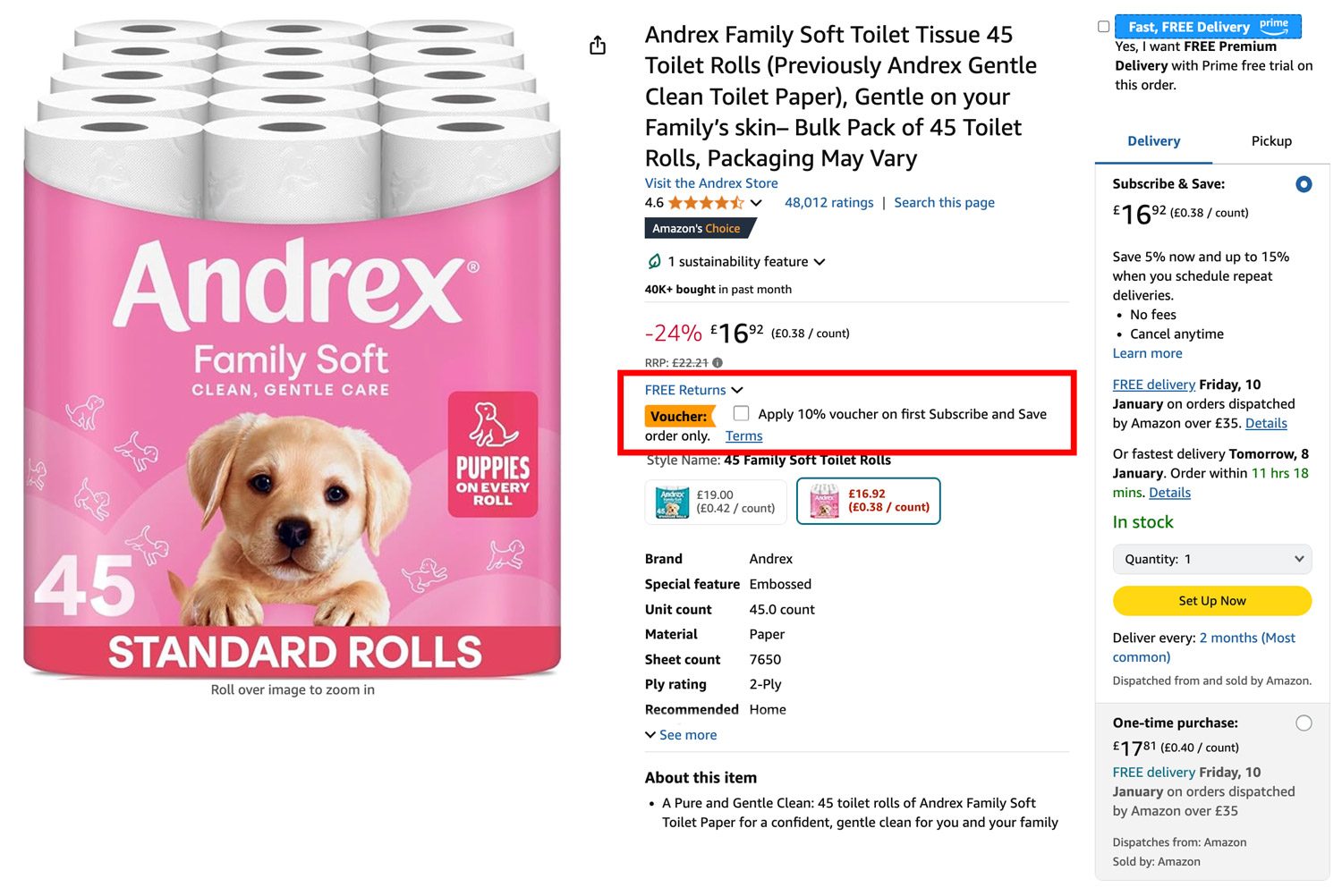
You can manage the setup of VPCs directly via Vendor Central. For VFMCs, Amazon's Subscribe & Save team automatically sets up these coupons to drive sales velocity, subscription adoption, and customer retention.
You can request access to VFMCs through your Vendor Manager or AVS. If you don't have a Vendor Manager, you can request the setup of VFMCs in Vendor Central under Contact Us » Promotions and Marketing » Subscribe & Save.
Understanding your Subscribe and Save performance in Vendor Central
Amazon offers a detailed dashboard that allows you to analyse your SnS performance at the account and ASIN level. To access it, navigate to Vendor Central » Merchandising » Subscribe and Save.
Once you're in the dashboard, you can select the vendor code, product code, category, subcategory, and ASIN you would like to analyse. Vendor Central also lets you define the exact date range for any metrics to review.
The dashboard is split into five reports:
- Sales Performance
- Coupon Performance
- Funding Performance
- Inventory Performance
- ASIN-Level Performance
Sales Performance Report
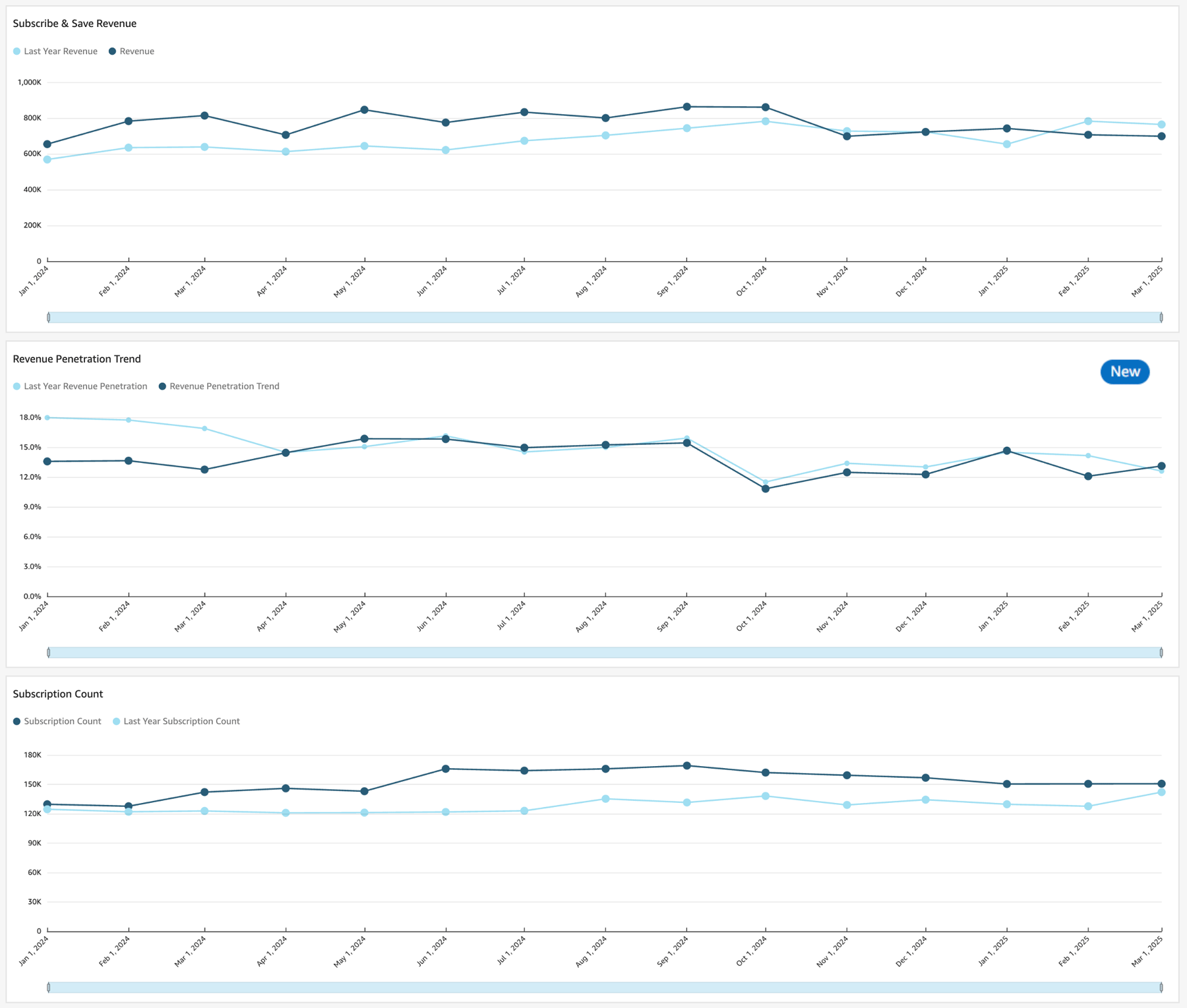
The Sales Report displays your SnS revenue and number of active subscriptions. It lets you easily spot seasonality effects and how your subscription business performs year over year.
The revenue penetration trend allows you to assess the SnS share of total revenue for selected enrolled in the programme.
Amazon also lets you dive deeper into the profiles of subscribers. You can gain insights into the subscriber lifetime value by customer segment in the last 24 months. Amazon considers existing Subscribers 'established' after 12 months, and otherwise as 'growing'.
Additionally, Amazon shows you the number of customers who have cancelled their subscription after just one delivery and those who remain subscribed or have received 2 or more SnS orders.
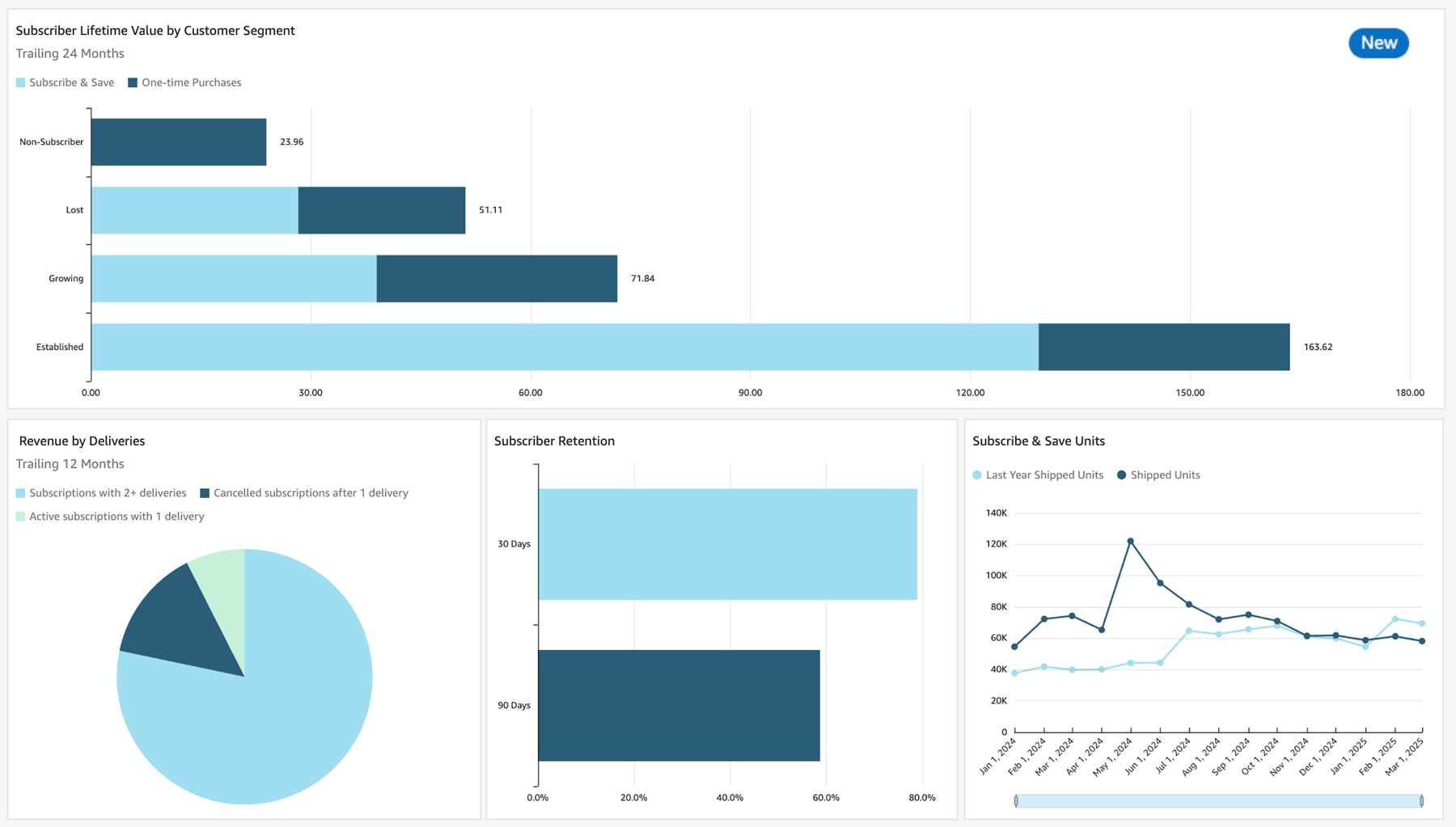
A KPI you want to keep close attention to is your Subscriber Retention Rate. Specifically, Amazon allows you to track the number of SnS shoppers who stay subscribed for more than 30 and 90 days.
A good benchmark is to keep your retention rate at or above 90% after 30 Days and above 75% after more than 90 Days.
Funding Performance Report
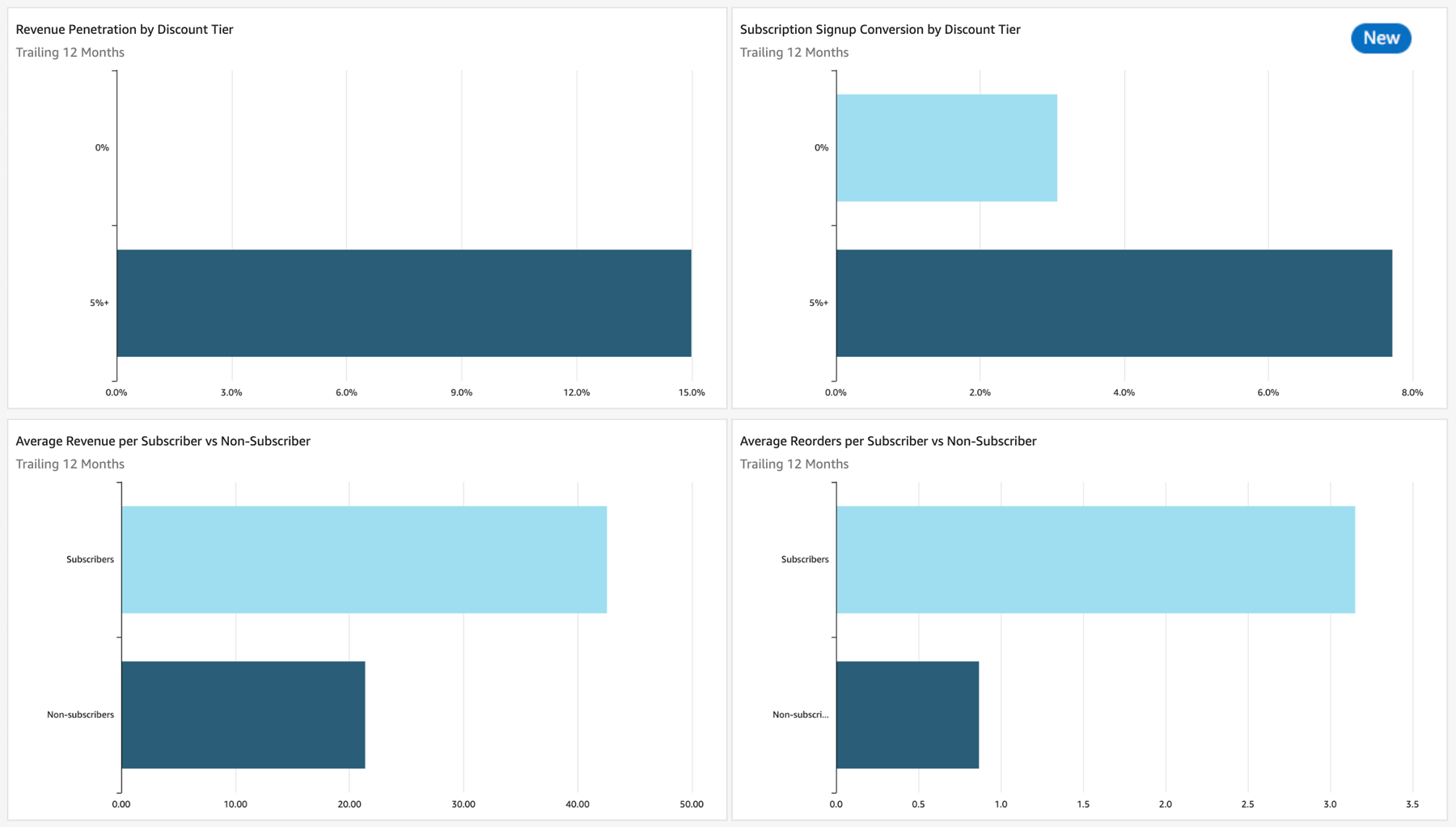
The funding strategy report provides vendors with insights into revenue conversion and performance for Subscribers vs Non-Subscribers.
You can access information about the Revenue Penetration and Subscription Signup Conversion by Discount Tier. The latter describes the percentage of customers who subscribe to your items (vs. placing one-time purchases).
Lastly, the dashboard allows you to assess the Average Revenue per Subscriber, as well as the Average Number of Reorders for each customer group.
Coupon Performance Report
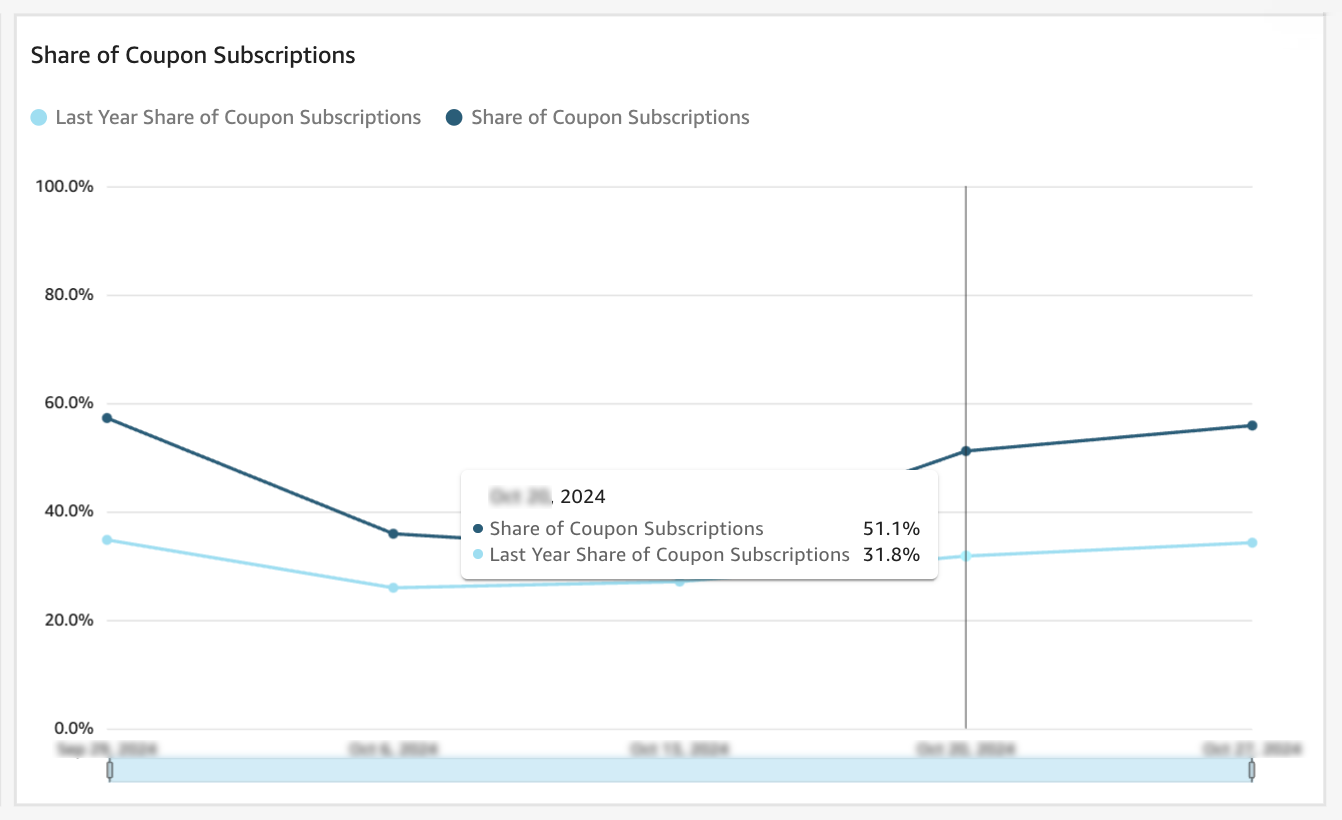
The Coupon Performance Report lets you assess how much SnS Coupons contribute to your SnS revenue over a given time period.
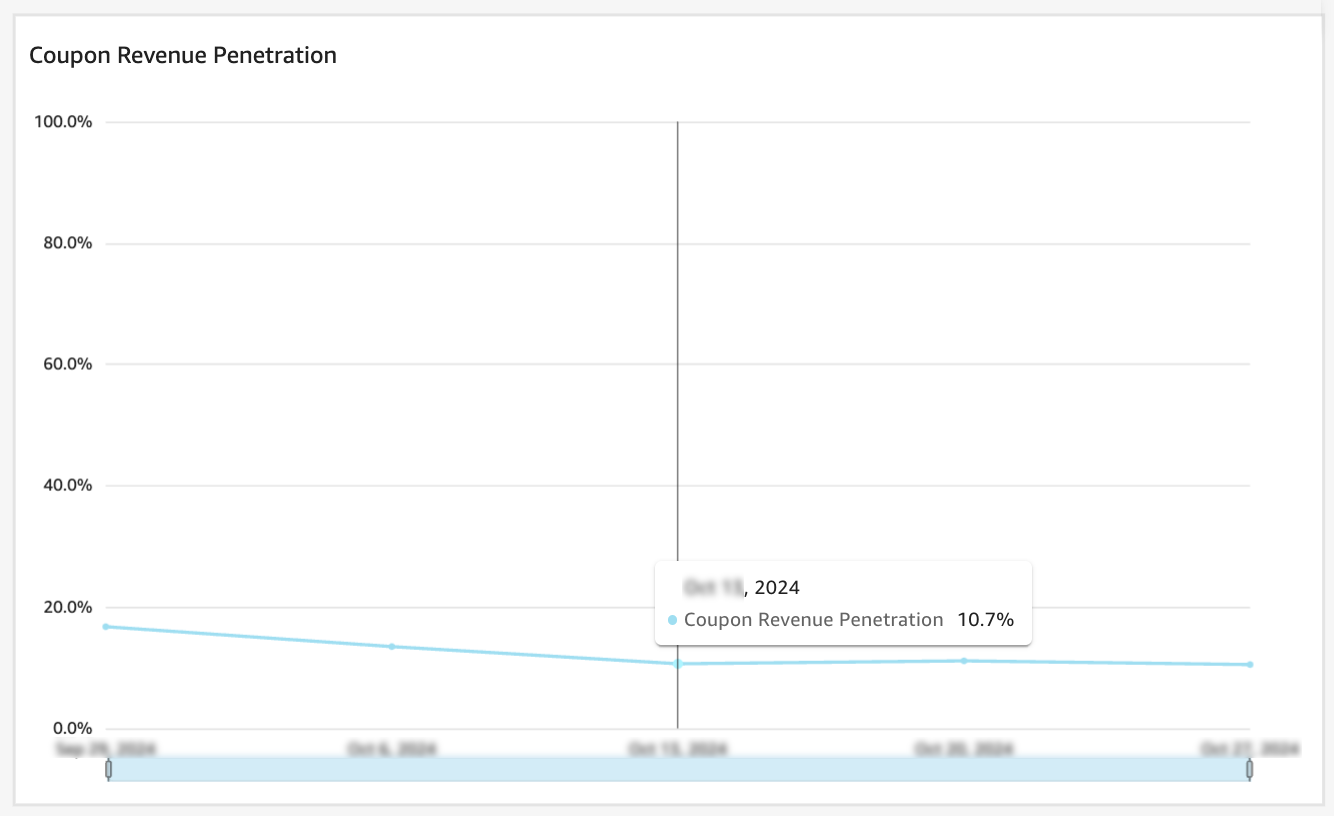
Vendor Central also displays the Share of Coupon Subscriptions. In other words: How many customers choose SnS for your brand because of coupons versus the standard discount on the product detail page.
Inventory Performance Report
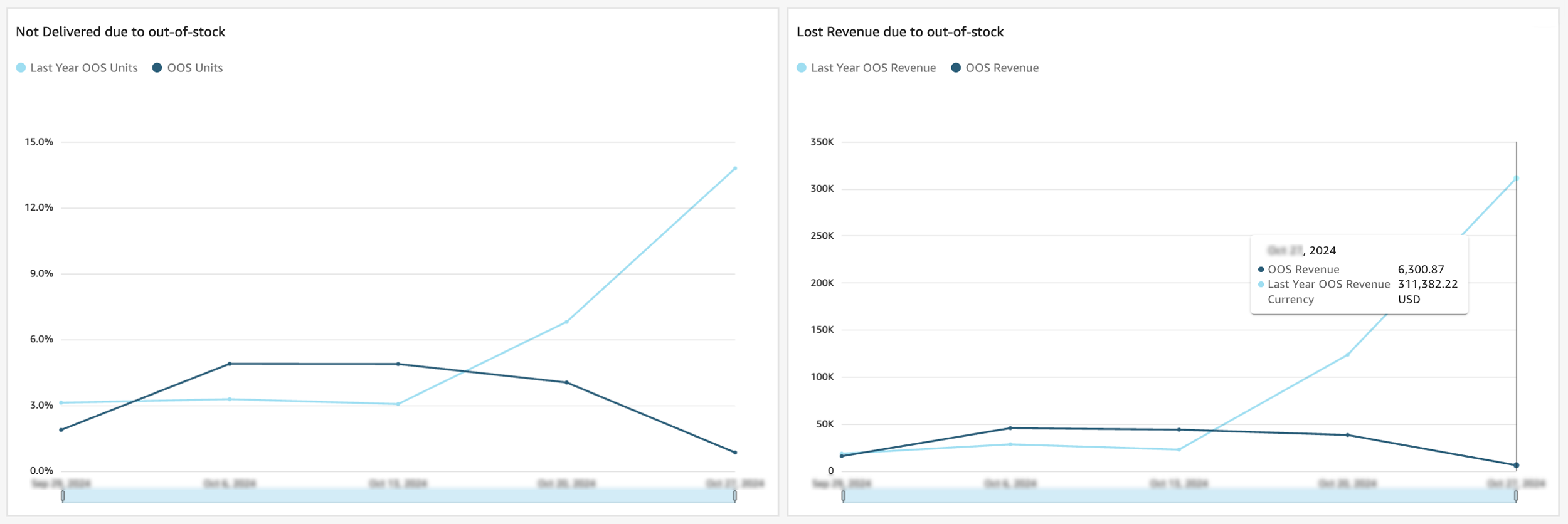
The Inventory Performance Report displays the impact of stockouts on Subscribe and Save. Specifically, it highlights how many product units were out of stock and the resulting revenue loss in dollars.
Vendors should avoid running out of stock where possible, as this prompts customers to cancel their subscription and look for alternatives.
ASIN-Level Performance Report
Need more granular data at the product level? Amazon has you covered. The SnS dashboard in Vendor Central now allows you to view and download a detailed list of your ASIN performance.
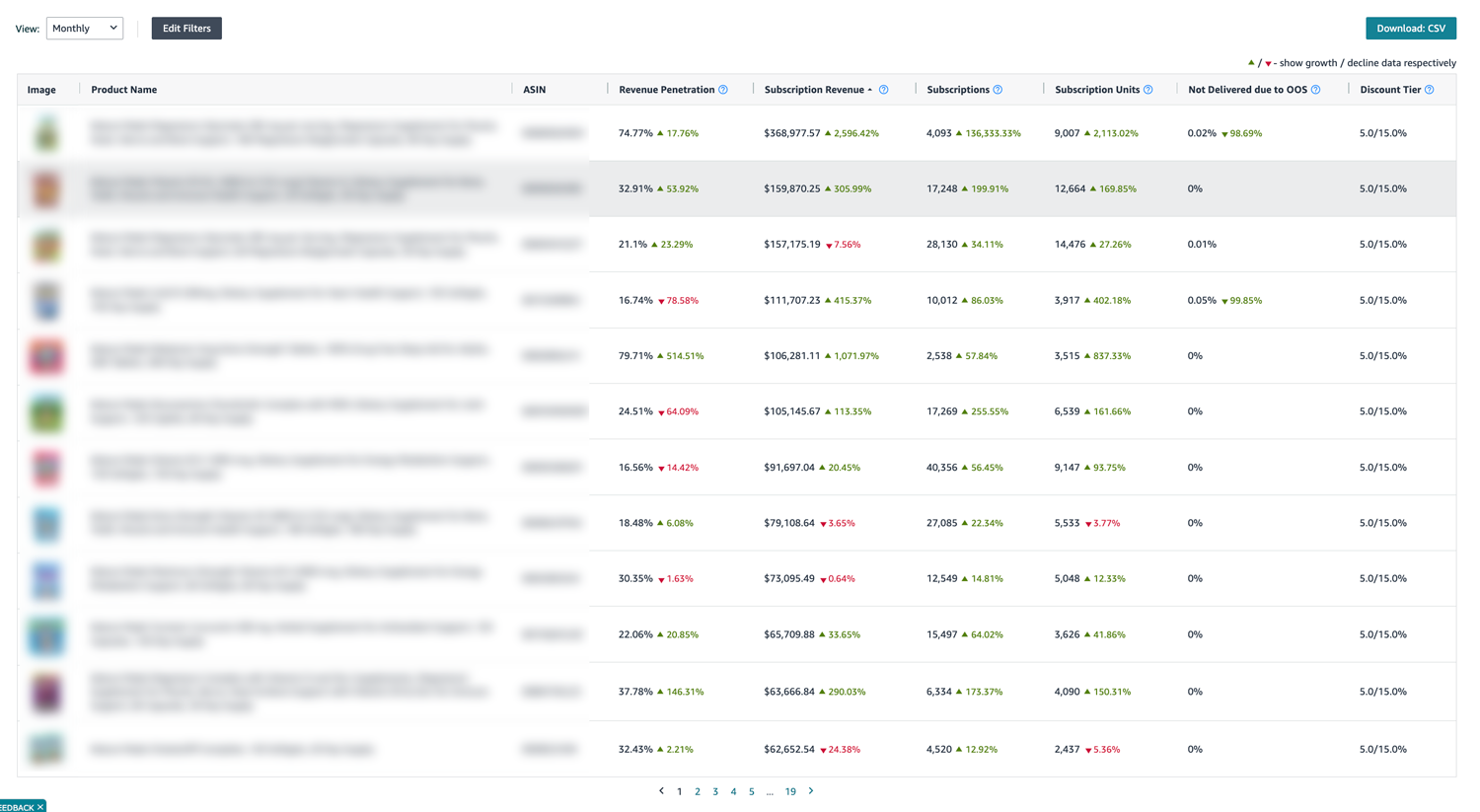
Available metrics include:
- Revenue Penetration
- Subscription Revenue
- Subscriptions
- Subscription Units
- Not Delivered due to OOS
- Discount Tier
| Metric | Definition |
|---|---|
| Revenue Penetration | The share of Subscribe and Save in your total account revenue. Revenue Penetration = Total SnS Revenue / Total Product Revenue. |
| Subscription Revenue | The sum of revenue from shipped subscription orders over a given period of time. |
| Subscriptions | The count of subscriptions that are active at the end of the time period. |
| Subscription Units | The sum of units from shipped subscription orders over a given period of time. |
| Not Delivered due to OOS | The % of units that were not delivered because the ASINs were out-of-stock. An increasing trend in this metric is considered a defect. |
| Discount Tier | The default discount structure offered to customers. |
Need help assessing your vendor performance with Amazon?
If you need help understanding your vendor performance on Amazon, get in touch. I offer tailored vendor audits to uncover your full margin potential with the online retailer.
Frequently Asked Questions (FAQ)
What happens when my product goes End of Life (EOL)?
If your product goes end of life, Amazon will notify customers that their SnS subscription will end and may offer them alternatives to subscribe to. You can work with your Vendor Manager or the Amazon Vendor Service (AVS) to switch existing SnS customers to any successor item. However, the new product must be similar to the item it replaces for this strategy to work.
What if I don't see the SnS dashboard in Vendor Central?
The SnS dashboard is available by default. However, if you can't see it in Vendor Central, your Vendor Manager or AVS must activate the dashboard for you. Please note that you should insist on this dashboard access as soon as you invest in any Subscribe and Save investment type.
What happens if I lose the Buy Box?
Subscribe and Save is a seller-specific offering. If you lose the Buy Box, Amazon will still fulfil Subscribe and Save orders to existing SnS customers. However, new SnS customers will be directed to the seller winning the Buy Box.
Does an active Subscribe and Save offering help win the Buy Box?
Yes and No. Offering SnS can help increase your conversion rates, which indirectly increases your chances of winning the Buy Box. However, if Amazon can't offer the product at a profit, you may still lose the Buy Box to 3P Sellers.
My Vendor Manager asks me to invest in SnS, but the discount is already active on my Product Detail Page?
Amazon may self-fund SnS discounts on products that customers repurchase. As this discount (typically 5% of the purchase price) lowers Amazon's profitability, your Vendor Manager is tasked to recoup the investment. It's best to review your current SnS performance in Vendor Central to assess whether funding the programme will return a good investment for your brand.
How much should I invest in Subscribe and Save?
The required investment depends on several factors: The number of existing subscriptions, the discount offered, and the profitability of your vendor account. If in doubt, it's best to run a limited trial for several months to assess the return on investment.
Can I negotiate SnS investments?
Yes! Subscribe and Save and Vendor Powered Coupons / VFMCs form part of your vendor negotiations with Amazon.
How can Subscribe and Save improve my sales performance?
Amazon claims that funding at 10% SnS discount can drive up to 1.8x more conversions over no discount at all. Amazon also states that investing $1 in coupons generates an average of $19 in PCOGs over an 18-month period.1
1 Based on documents shared by Amazon with Consulterce clients.