
Portfolio Management
Reorder and Save: Complete Guide for Amazon Vendors
 Written by Martin HeubelUpdated 16 Sept 2026
Growing on Amazon used to be straightforward: Simply list your products, optimise your PDPs and take part in deal events.
Today, this growth formula no longer works when selling to the world's largest online retailer. Competition on Amazon has risen, and so have your customer acquisition costs.
Thankfully, Amazon still offers several levers that brands can use to reactivate shoppers. One of these is Reorder and Save (RnS).
In today's article, I'll explain:
What is Reorder and Save?
Reorder and Save lets 1P vendors offer a rebate to shoppers who previously purchased their products but did not reorder within the typically expected time frame.
As such, Reorder and Save isn't a tool to acquire new customers. It's a tool to reactivate shoppers who have already bought from your brand and encourage them to make another purchase.
This separates Reorder and Save coupons from Standard coupons and Subscribe and Save coupons that shoppers can redeem on the Amazon deals page.
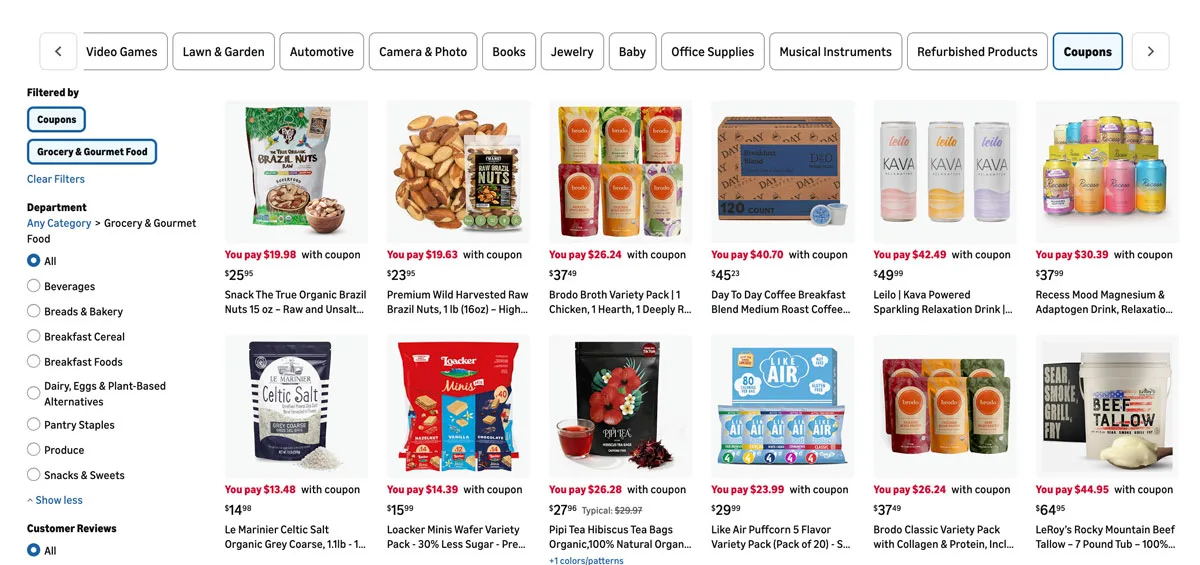
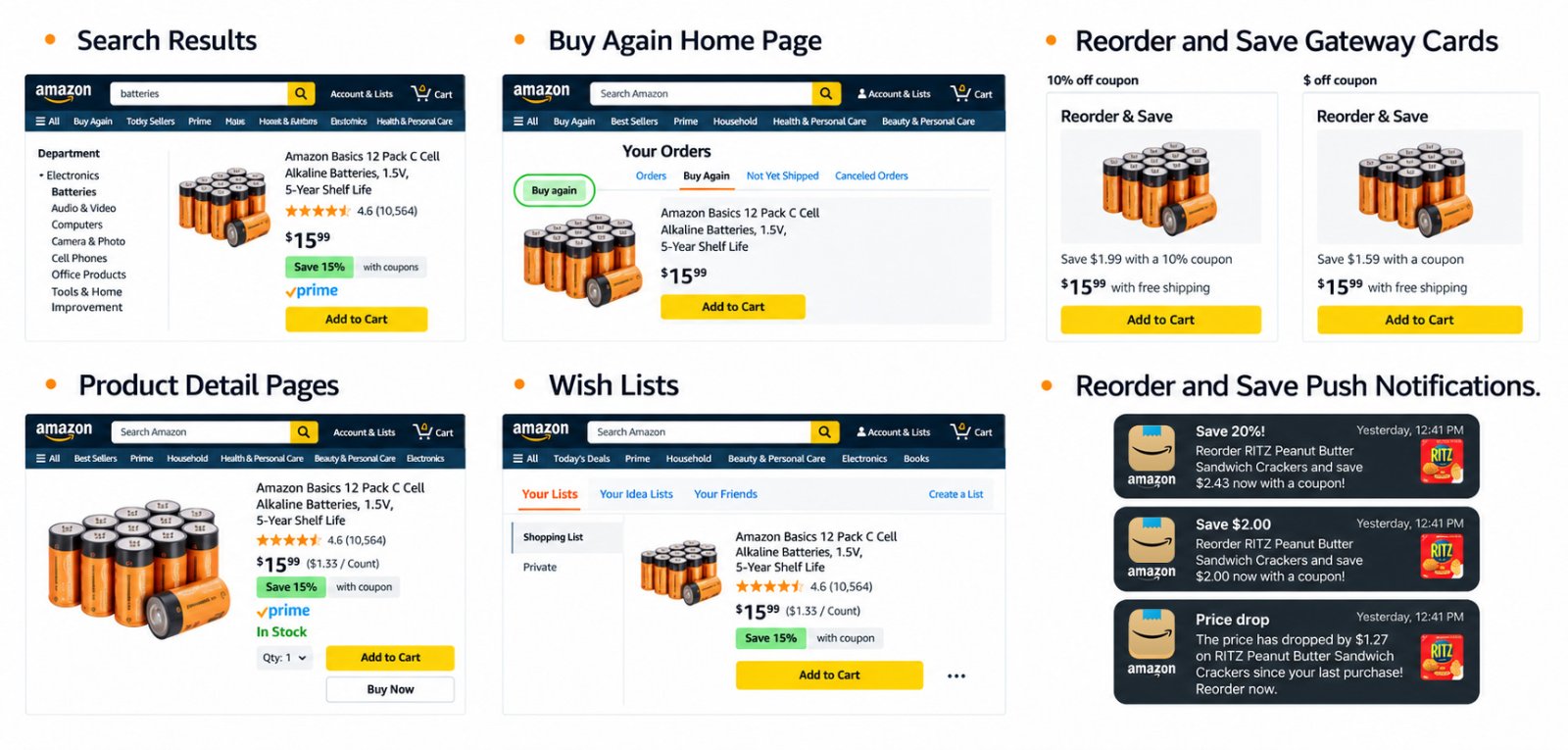
Reorder and Save coupons automatically appear for eligible shoppers across Amazon pages and in the mobile app via dedicated push notifications.
However, similar to Subscribe and Save, not every category is eligible for RnS coupons. Reorder and Save is available to brands selling in categories with regular replenishment cycles, such as:
- Grocery
- Beer, Wines & Spirits
- Luxury Food & Drink
- Pet Supplies
- Health & Wellness
- Beauty & Personal Care
- Baby Care
- Household & Home Care
- Office Supplies
- Automotive Parts & Tools
- Home Improvement
- Fashion (Underwear, Accessories)
The benefits of Reorder and Save
If you're selling in FMCG or accessory categories, RnS campaigns can be an effective way to re-engage customers and extend their lifecycle with your brand.
It allows you to offer a discreet discount without disrupting your omnichannel pricing strategy. Meaning that your Buy Box price remains unaffected, which is particularly important if you want to protect your price positioning on Amazon.
Another benefit worth noting: Reorder coupons and Subscribe and Save coupons can run at the same time, but they cannot be stacked by customers. So if a shopper qualifies for both a Subscribe and Save and a Reorder and Save coupon, they must decide which coupon to redeem at checkout.
As a result, Reorder and Save can help reduce your cost of reactivating an existing customer compared with repeatedly paying to reach the same shopper through advertising or promotional discounts.
When should 1P vendors use Reorder and Save?
Not every eligible ASIN will perform equally well in a Reorder campaign. I typically recommend selecting products that have:
- High repeat-purchase rates
- Predictable replenishment cycles
- Healthy product margins
- Strong sales history
- High customer acquisition cost
For CPG brands, this often means prioritising your hero or accessory ASINs rather than activating Reorder and Save across your entire catalogue (e.g., toothbrush heads vs the electric toothbrush handle).
How to set up Reorder and Save campaigns?
Setting up Reorder and Save campaigns is simple:
Go to Vendor Central » Merchandising » Coupons and click the "Create a new campaign" button. Then select "Reorder Coupon" to download the spreadsheet and set up your campaign.
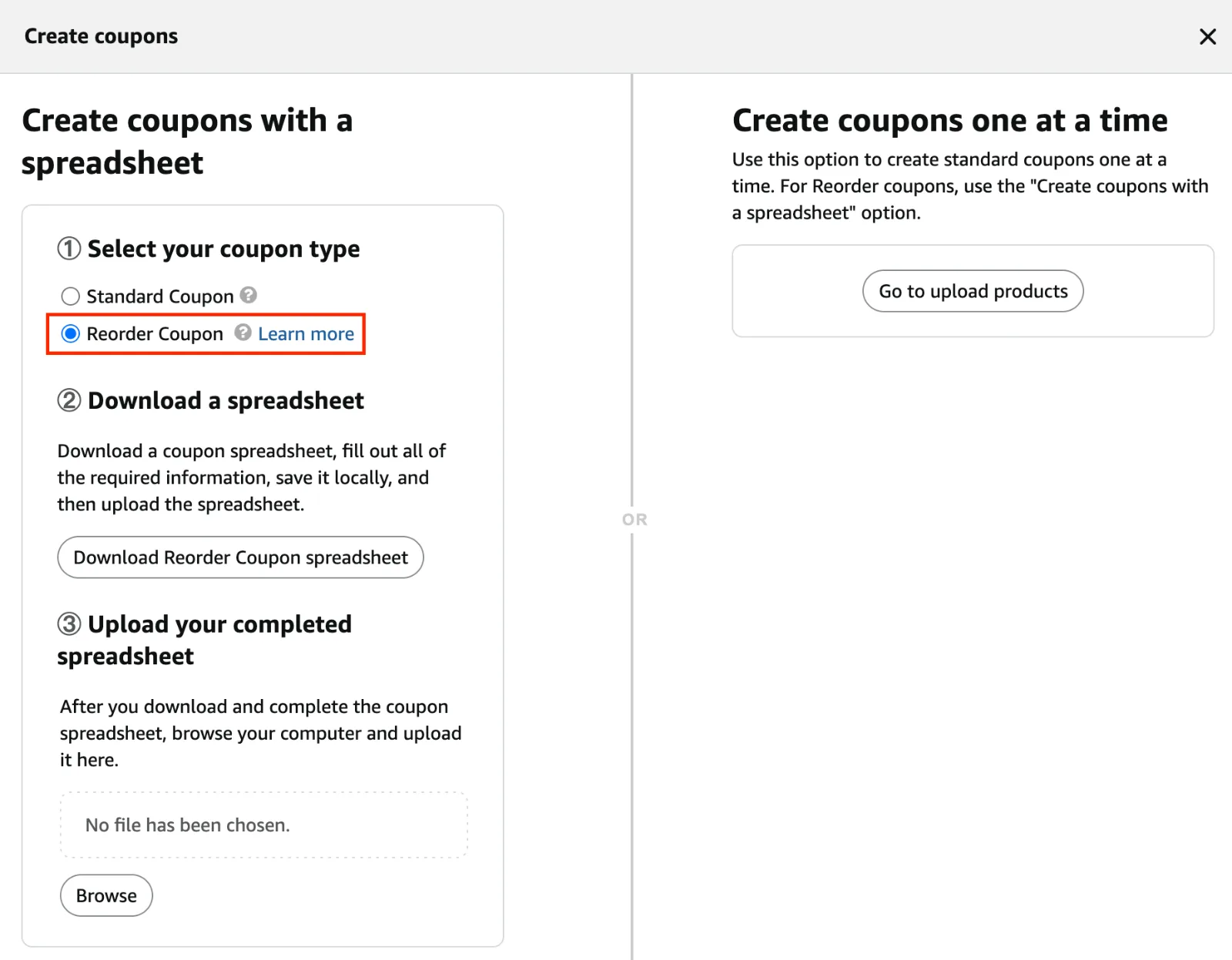
Within the spreadsheet, you can define the ASINs, your budget, the start and end dates, and whether you would like to offer a fixed dollar amount or a percentage discount for your Reorder and Save campaign.
Understanding your Reorder and Save performance in Vendor Central
To understand your Reorder and Save performance in Vendor Central, simply go to Merchandising » Reorder & Save.
The available reporting dashboard lets you access your ROI, Reorder Revenue, Total Number of Redemptions, Reorder Clips, and Total Discount.
You can filter your performance by vendor codes and product categories, and view your performance history by month, quarter, or year.
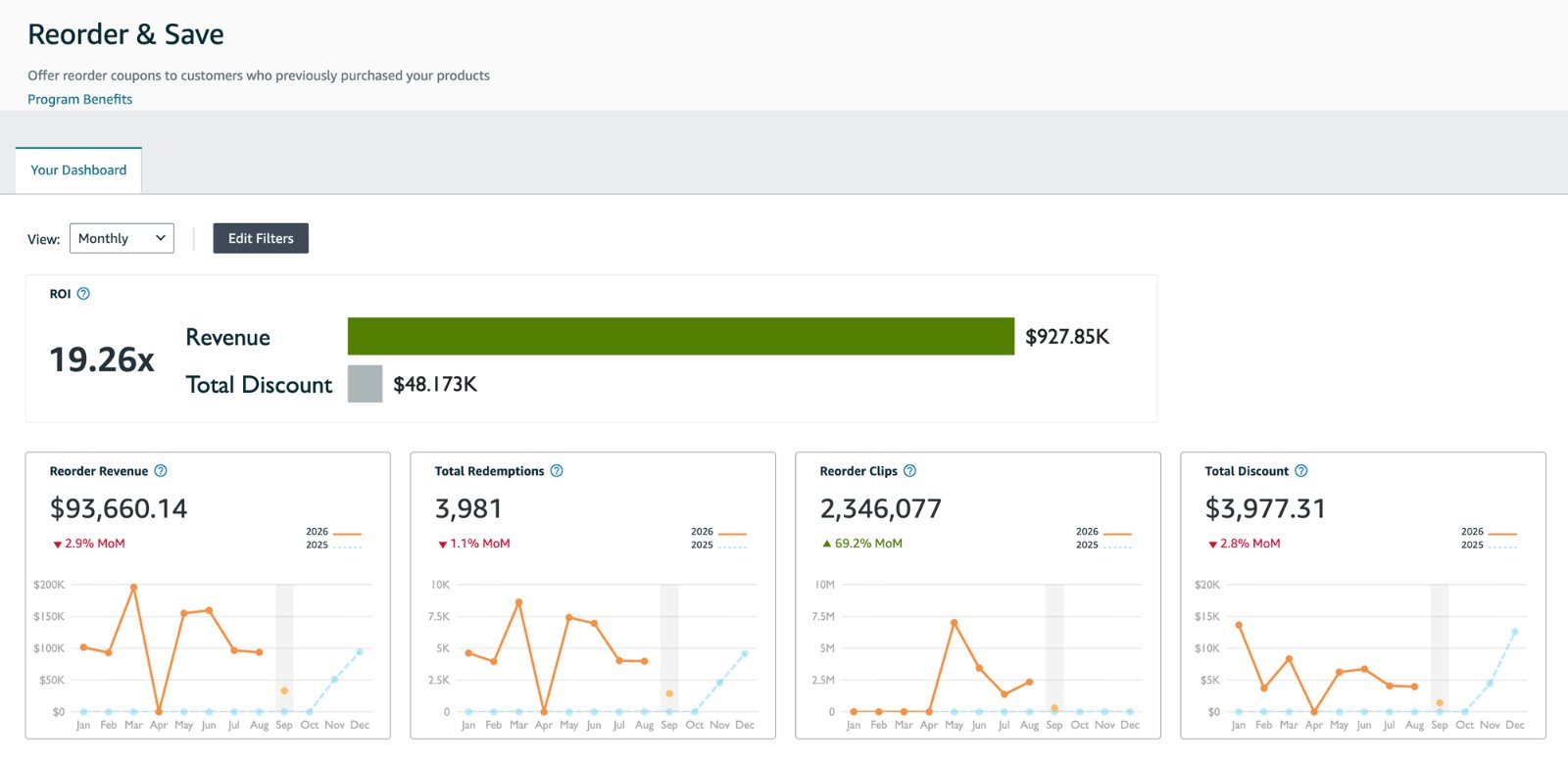
If you're subscribed to the Amazon Vendor Service (AVS), you can also request a more detailed performance report at the ASIN level from your Customer Service Representative.
Conclusion
Reorder and Save is one of the more interesting retention tools available to 1P vendors. It allows you to target existing shoppers without lowering your Buy Box price and can complement your Subscribe and Save customer retention efforts.
However, let me say this clearly: Reorder coupons are not a substitute for properly understanding why a shopper has not made a second purchase in the first place.
Analysing customer reviews, return reasons and repeat-purchase rates, while continuously optimising your retargeting efforts, remains critical. The goal should always be to maximise repeat purchases organically first, before relying on discounts to bring customers back.
Frequently Asked Questions (FAQ)
Is Reorder and Save better than Subscribe and Save?
Reorder and Save is designed to reactivate previous shoppers, while Subscribe and Save is designed to automate future purchases. The performance of each programme depends on your product, customer behaviour and retention strategy.
How is Reorder and Save different from Subscribe and Save?
Reorder coupons target shoppers who have purchased a product from your brand but have not replenished their order in the typically expected time frame. As such, they're one-time discounts to get shoppers to reorder from your brand. Conversely, Subscribe and Save automates the regular order process in exchange for a discount.
How do I access the Reorder and Save portal in Vendor Central?
You can access it via Vendor Central » Merchandising » Reorder & Save. If you cannot see it, you'll need to raise a case with Amazon's support team and request access to it.
How should I approach Reorder and Save campaigns?
When evaluating the investment opportunity in Reorder and Save, I recommend starting with an initial test-and-learn budget. This way, you can assess how well RnS coupons work for your brand and assortment, before committing a larger portion of your promotional budget against it.
Should I follow my Vendor Manager's advice and invest in an RnS accrual?
You don't need to invest in a Reorder and Save accrual, which often comes at a high investment rate. You can simply set up your own Reorder campaigns in Vendor Central under Merchandising » Coupons.
Can Reorder and Save coupons be combined with other promotions?
If an ASIN already has a Standard coupon, the Reorder coupon will be suppressed. Subscribe and Save and Reorder coupons can coexist, but customers cannot stack both discounts.
Can I choose which ASINs participate in Reorder and Save?
Yes. When creating your own Reorder campaigns in Vendor Central, you can select the ASINs you want to include rather than funding your entire portfolio.
Which ASINs should I include in a Reorder and Save campaign?
Prioritise ASINs with high repeat-purchase rates, predictable replenishment cycles and healthy margins. Avoid applying RnS broadly across your entire catalogue without first testing performance.
Does Reorder and Save affect my Buy Box price?
No. Reorder and Save provides an eligible shopper with a targeted discount without lowering the displayed Buy Box price.
How long should I run a Reorder and Save campaign?
I recommend running the campaign long enough to cover the typical replenishment cycle of the products involved and generate enough redemptions to assess performance reliably.